CapCut APK Download ~ Free Video Editor
Edit short videos with auto captions, keyframes and background removal. Download CapCut for Android and start creating today.
CapCut APK features
The tools creators reach for first, all in one app.
AI-powered tools
Turn a short idea into a video draft, then refine it on the timeline. Auto captions, text to speech and background removal save hours of manual work.
APK DownloadTemplates and auto captions
Start from a ready-made template, drop in your clips and add captions in one tap. Choose a caption style that fits your video.
APK DownloadPro-level editing
Keyframe animation, masking and 4K export give you detailed control over every scene. Some premium effects and templates need a paid Pro plan.
APK DownloadHow to download and install CapCut APK
- Tap APK DownloadThe button starts the file download.
- Allow the installAndroid may ask you to allow installs from your browser. Allow it for this file only, then turn it off again.
- Open and sign inLaunch CapCut, sign in with Google, TikTok or email, and start editing.
More ideas for you
Why creators love CapCut
A few reasons CapCut is a favourite for short videos.
Quick to learn
A friendly layout means you can finish a first video in minutes.
Full of creative tools
Effects, filters, text styles and transitions to match your style.
Music and sound
Add songs, effects and voiceovers to bring your story to life.
Auto captions
Make your videos easy to follow, even with the sound off.
Great for social video
Made for Reels, Shorts, TikTok-style clips and YouTube.
Use it everywhere
Available for Android, iPhone, iPad, Windows and Mac.
CapCut features: everything you can do in the app
CapCut packs a lot into one app. Here is a plain-language tour of the tools people use most, with a tip for each one.
Whether you are making your first Reel or your fiftieth video, it helps to know what is available. We went through the features creators ask about the most and explained them the way we would to a friend. For step-by-step lessons, visit our blog.
Easy timeline editing
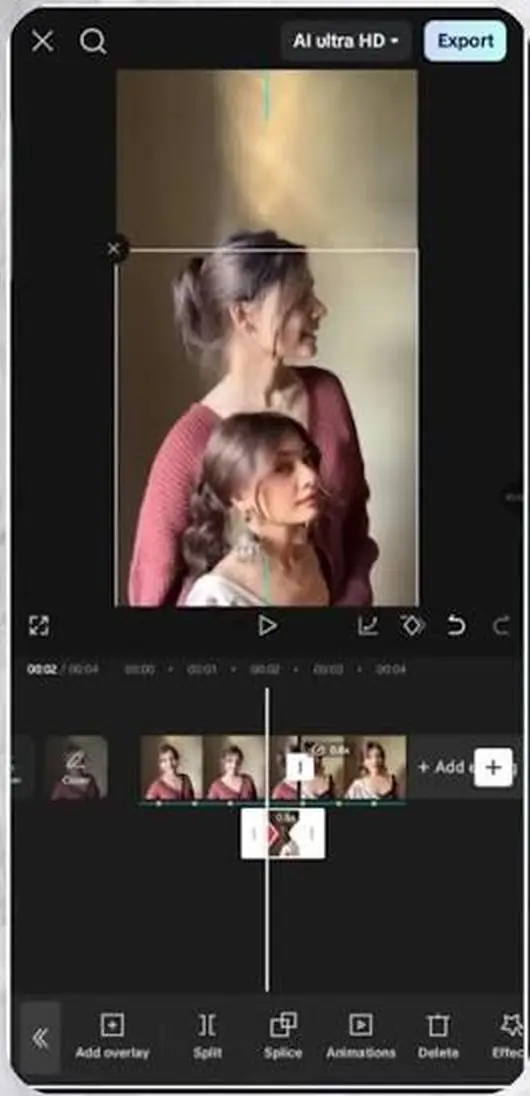
Everything starts on the timeline. You line your clips up, trim the edges, split a clip where you want a cut and drag pieces into a new order. It feels closer to moving blocks around than to using complicated software. If you ever make a mistake, the undo button is right there, so you can try ideas freely.
Tip: zoom in on the timeline when you want to cut very close to a word or a beat.Auto captions
Auto captions listen to the speech in your video and write the words on the screen. You choose the language, tap Generate and wait a few seconds. Then you can fix any word and change the font, colour and animation. Captions help people follow your story with the sound off, which is how a lot of videos are watched.
Tip: read the captions once before you export, because names and slang are the words most often misheard.Text styles and animations
Titles, labels and quotes are easy to add. CapCut offers many fonts, outlines, shadows and ready-made text styles, plus in and out animations. A short title with a clean style can make a simple clip look planned.
Tip: stay with one or two fonts in a video so it looks tidy.Templates
Templates are ready-made video layouts. You pick one you like, drop in your own photos or clips and the cuts, music and effects follow the design. They are a lovely shortcut when you need a good-looking video quickly, and a good way to learn how pacing works.
Tip: choose a template with a similar number of clips to the ones you have.Keyframes
Keyframes let you change something over time: a slow zoom, a sliding sticker, a fading overlay. You set a keyframe at the start, move along the timeline, change the size or position, and CapCut fills in the movement between the two points. Small, gentle motion is often the most professional.
Tip: keep zooms to about five to ten percent so the movement feels natural.Speed control and curves
You can speed a clip up, slow it down or use a speed curve for a smooth ramp. A curve lets you keep the start at normal speed, slow down for the most exciting second and then return to normal. It is a favourite for sports, travel and dance clips.
Tip: film at a higher frame rate if you plan to use slow motion.Background removal
CapCut can cut a person or object out of a scene without a green screen, so you can place them on a new background or behind text. For clean results, use footage where the subject stands out clearly from what is behind them.
Tip: good lighting and a plain background help the cutout look sharp.Effects, filters and transitions
Filters change the mood of your colours, effects add movement and sparkle, and transitions smooth the jump between clips. The trick is to use them with care. One filter across the whole video, plus a transition only where it helps the story, usually looks best.
Tip: if you notice the effect more than the content, remove it.Music, sound effects and voiceover
You can add songs, sound effects and your own voice. Place the music so it starts where you want, lower its volume under speech and cut your clips on the beat. A short sound effect on a title or a swipe adds a surprising amount of polish.
Tip: use the volume controls to keep the voice clear above the music.Text to speech
If you prefer not to record your voice, text to speech reads your written text aloud in a selection of voices. It is handy for explainers, tutorials and videos where you want a steady narrator.
Tip: write short, simple sentences, since they sound more natural when spoken.Stabilise and enhance
Shaky footage and soft colours are common when you film on the move. CapCut includes tools that help steady a clip and improve its look, so more of your recordings become usable.
Tip: even with these tools, holding your phone with both hands gives the best base.Export in the quality you choose
When you finish, you choose the resolution and frame rate. 1080p at 30 frames per second suits most Reels and Shorts, while higher options are available for bigger screens. Check your video once from start to end before you share it.
Tip: higher quality means a larger file, so pick what your platform needs.What you can make
CapCut is flexible enough for almost any idea. Here are some popular projects to inspire your next video:
- Reels and Shorts with captions and music
- Travel diaries and holiday highlights
- Product and small business videos
- Tutorials and how-to guides
- Photo slideshows for birthdays and events
- Vlogs and daily stories
Get started in five easy steps
1. Tap APK Download and install CapCut. 2. Open the app and start a new project. 3. Pick your clips and arrange them on the timeline. 4. Add music, captions and effects. 5. Export in the quality you like and share it with the world.
Answers to your questions
Is CapCut APK free?
Yes, you can download and use it for free. A paid Pro plan adds extra effects, templates and options.
Is it safe to download?
Download only from the official CapCut link, Google Play or the App Store. Files from unknown websites can carry malware.
Which devices does CapCut run on?
Android, iPhone and iPad, and Windows and Mac computers.
How do I get CapCut Pro?
Install the app, open it and choose a plan inside CapCut.
Can beginners use it?
Yes. The layout is simple and templates help you start quickly.
Does CapCut work on Android phones?
Yes. This page is for Android, and CapCut also has versions for iPhone, iPad, Windows and Mac.
How big is the app?
About 300 MB, so it is nice to download on Wi-Fi.
What is the latest version shown here?
Version 18.5.1 at the time of writing. Check the Download page for current details.
Can I add captions automatically?
Yes. The auto captions tool listens to your video and writes the words for you, and you can edit and style them.
Where can I find editing tips?
Our Blog has step-by-step guides for captions, templates, speed changes and exporting.
Are all CapCut features free?
You can start editing for free. Some premium effects, templates and options belong to an optional Pro plan.
Which feature should a beginner learn first?
Start with trimming and splitting on the timeline, then try auto captions and music. They give the biggest improvement for the least effort.
Do these features work on every device?
CapCut is available for Android, iPhone, iPad, Windows and Mac. Menus can look a little different from device to device, but the main ideas are the same.